DataLab Cup 2: CNN for Object Detection
Fall 2026
Competition Info
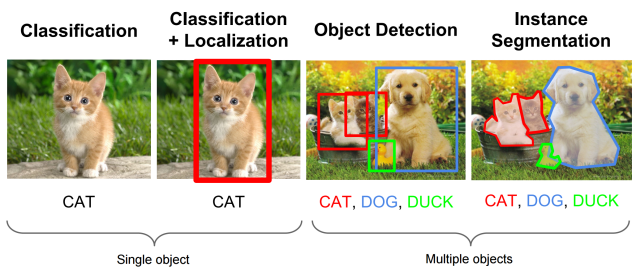
In this competition, you have to train a model that recognizes objects in an image. Your goal is to output bounding boxes for objects.
Platform: Kaggle
Problem description
Given an image(shape = [undefined, undefined, 3]), you need to output bounding box ($x_{min}$, $y_{min}$, $x_{max}$, $y_{max}$, class_label, confidence_score) for objects showed in image and its class.(picture source)
Data provided
Dataset: PASCAL VOC2007
The dataset contains 20 classes. The train/val data has 5012 images containing 12608 annotated objects. We have preprocessed training dataset(5012 images) and testing dataset(4953 images) for you. You can download them on Kaggle.
Processed data format
The information for each image of training data are recorded in VOCdevkit_train/VOC2007/Annotations. However, we have processed those files for you into one record file: pascal_voc_training_data.txt in which each line records informations of each training images.
The data format of pascal_voc_training_data is:
[$image\_name$ $xmin_i$ $ymin_i$ $xmax_i$ $ymax_i$ $class_i$] (repeat number of objects times)
Elements are separated by space.
training_data_file = open("./pascal_voc_training_data.txt", "r")
for i, line in enumerate(training_data_file):
    if i > 5:
        break
    line = line.strip()
    print(line)
000005.jpg 263 211 324 339 8 165 264 253 372 8 5 244 67 374 8 241 194 295 299 8 277 186 312 220 8
000007.jpg 141 50 500 330 6
000009.jpg 69 172 270 330 12 150 141 229 284 14 285 201 327 331 14 258 198 297 329 14
000012.jpg 156 97 351 270 6
000016.jpg 92 72 305 473 1
000017.jpg 185 62 279 199 14 90 78 403 336 12
As you can see, one image may have multiple objects. Another thing to note is, the heights and widths of the images in this datset are different. Therefore, you are suggested to reshape images and ground truth bounding boxes' coordinates into same size.
In this competition, you can implement all kinds of object detection models (R-CNN, Fast-RCNN, Faster-RCNN, YOLOs, SSD,...etc.). Here we provide a simple template based on YOLO(You Only Look Once).
import torch
import torch.nn as nn
import torch.nn.functional as F
from torch.utils.data import Dataset, DataLoader
import numpy as np

device = torch.device('cuda' if torch.cuda.is_available()
                      else 'mps' if torch.backends.mps.is_available() else 'cpu')
print('Using device:', device)
Using device: mps
There's no per-GPU visibility/memory-growth configuration to do in PyTorch -- device above (plus CUDA_VISIBLE_DEVICES if you need to pick which GPU) is all you need.
- Hyperparameters
# common params
IMAGE_SIZE = 448
BATCH_SIZE = 8
NUM_CLASSES = 20
MAX_OBJECTS_PER_IMAGE = 20

# dataset params
DATA_PATH = './pascal_voc_training_data.txt'
IMAGE_DIR = './VOCdevkit_train/VOC2007/JPEGImages/'

# model params
CELL_SIZE = 7
BOXES_PER_CELL = 2
OBJECT_SCALE = 1
NOOBJECT_SCALE = 0.5
CLASS_SCALE = 1
COORD_SCALE = 5

# training params
LEARNING_RATE = 1e-4
EPOCHS = 3
Dataset Loader
We define a class especially to process training data, reading the records from pascal_voc_training_data.txt and follow the steps below to prepare data for our network:
- Create Dataset using tensorflow data API.
- In Dataset map function, read images and do preprocessing(ex. resizing , normalization).
- In Dataset map function, change box information
[xmin, ymin, xmax, ymax]coordinates into[xcenter, ycenter, width, height]attributes, which is easier for YOLO model to use. - Batch, Shuffle operations.
PyTorch's equivalent of a tf.data.Dataset + .map() pipeline is a Dataset.__getitem__ (per-sample preprocessing) wrapped in a DataLoader (shuffling/batching) -- see CONVENTIONS.md / the note in 11-1_CNN.ipynb's Input Pipeline section for the general mapping.
from PIL import Image

class PascalVOCDataset(Dataset):
    """
    Load pascalVOC 2007 dataset and creates an input pipeline.
    - Reshapes images into 448 x 448
    - converts [0, 1] to [-1, 1]
    - each __getitem__ call returns one preprocessed (image, labels, object_num)
    """

    def __init__(self):
        self.image_names = []
        self.record_list = []
        self.object_num_list = []
        # filling the record_list
        input_file = open(DATA_PATH, 'r')

        for line in input_file:
            line = line.strip()
            ss = line.split(' ')
            self.image_names.append(ss[0])

            self.record_list.append([float(num) for num in ss[1:]])

            self.object_num_list.append(min(len(self.record_list[-1]) // 5,
                                            MAX_OBJECTS_PER_IMAGE))
            if len(self.record_list[-1]) < MAX_OBJECTS_PER_IMAGE * 5:
                # if there are objects less than MAX_OBJECTS_PER_IMAGE, pad the list
                self.record_list[-1] = self.record_list[-1] + \
                    [0., 0., 0., 0., 0.] * \
                    (MAX_OBJECTS_PER_IMAGE - len(self.record_list[-1]) // 5)

            elif len(self.record_list[-1]) > MAX_OBJECTS_PER_IMAGE * 5:
                # if there are objects more than MAX_OBJECTS_PER_IMAGE, crop the list
                self.record_list[-1] = self.record_list[-1][:MAX_OBJECTS_PER_IMAGE * 5]

    def __len__(self):
        return len(self.image_names)

    def __getitem__(self, idx):
        image_name = self.image_names[idx]
        raw_labels = np.array(self.record_list[idx], dtype=np.float32).reshape(-1, 5)
        object_num = self.object_num_list[idx]

        img = Image.open(IMAGE_DIR + image_name).convert('RGB')
        w, h = img.size

        width_ratio = IMAGE_SIZE * 1.0 / w
        height_ratio = IMAGE_SIZE * 1.0 / h

        img = img.resize((IMAGE_SIZE, IMAGE_SIZE))
        image = torch.from_numpy(np.array(img)).permute(2, 0, 1).float()  # (3, H, W)
        image = (image / 255) * 2 - 1

        xmin, ymin, xmax, ymax, class_num = raw_labels.T

        xcenter = (xmin + xmax) * 1.0 / 2.0 * width_ratio
        ycenter = (ymin + ymax) * 1.0 / 2.0 * height_ratio

        box_w = (xmax - xmin) * width_ratio
        box_h = (ymax - ymin) * height_ratio

        labels = torch.from_numpy(
            np.stack([xcenter, ycenter, box_w, box_h, class_num], axis=1).astype(np.float32))

        return image, labels, object_num


def make_dataloader():
    return DataLoader(PascalVOCDataset(), batch_size=BATCH_SIZE, shuffle=True,
                       num_workers=0, drop_last=True)
Now we can simply new a DatasetGenerator which can provide batches of training data for our model.
Object Detection Model (YOLO)
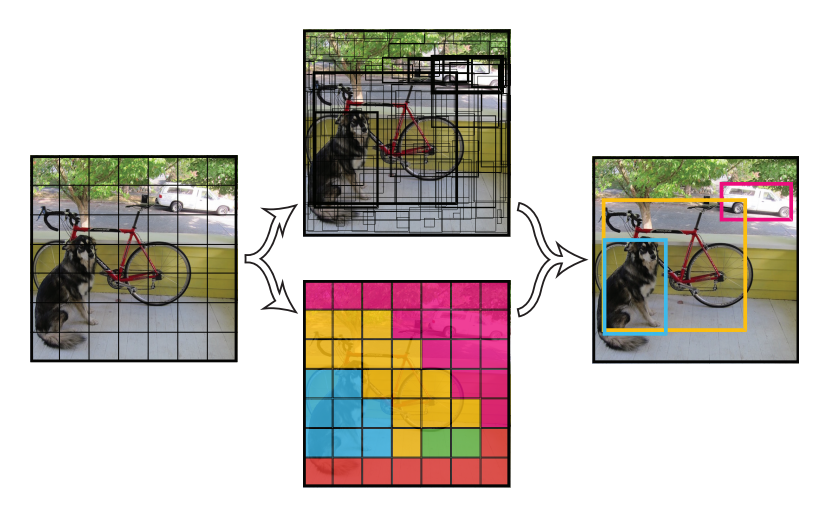
Different from Region Proposal based model, YOLO divide an image into cell_size$\times$cell_size (say 7$\times$7) cells, each has fixed number of output prediction boxes(coordinates, class_number, and confidence score). The final prediction would be the boxes with highest confidence score. The prediction of YOLO can be based on the output features extracted by the convolutional layers on the input image, which is actually "look once" on each image.
Intersection Over Union(IoU)
The loss calculation of YOLO includes calculating the intersection over union between the predicted boxes and the ground truth boxes. IoU is a common way to evaluate whether the predicted box coordinate is precise enough or not. The calcuation of iou is
$$Predicted\_Box\cap GroundTruth\_Box \over{Predicted\_Box\cup GroundTruth\_Box}$$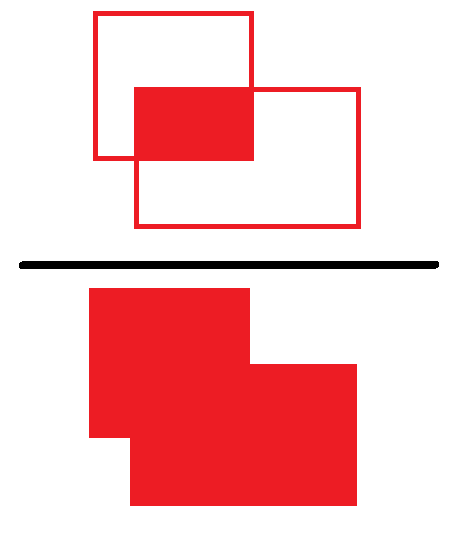
So we would like the IoU of our prediction and the ground the larger the better. In addition, IoU is also used when we evaluate an object detection model is good or not: the prediction is success if the IoU of the predicted box and the ground truth is larger than a threshould.
Model Architecture
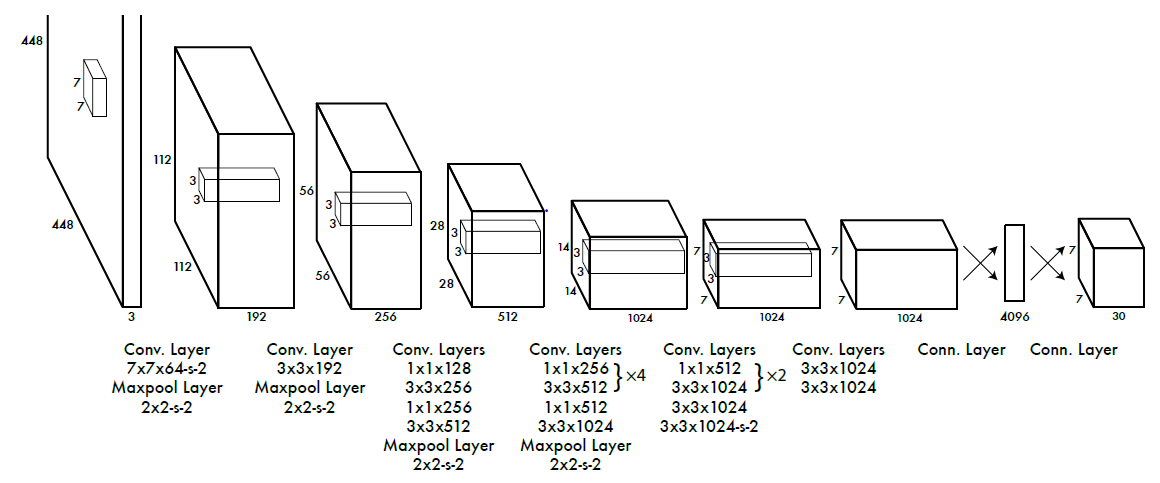
24 convolution layers followed by 2 fully connected layers.
Use a linear activation function for the final layer and all other layers use the following leaky rectified linear activation:
model
def conv_leaky_relu(in_channels, out_channels, size, stride):
    padding = size // 2  # Keras padding='same' for odd kernels & stride 1;
    # for the stride-2 convs below this gives the same *output size* as TF's
    # (slightly asymmetric) 'same' padding, just pixel-aligned symmetrically
    # instead -- see the note in 13-3_Diffusion.ipynb's DownSample.
    return nn.Sequential(
        nn.Conv2d(in_channels, out_channels, size, stride, padding=padding),
        nn.LeakyReLU(0.1),
    )
class YOLONet(nn.Module):
    def __init__(self, image_size, num_classes, cell_size, boxes_per_cell):
        super().__init__()
        self.features = nn.Sequential(
            conv_leaky_relu(3, 64, 7, 2),
            nn.MaxPool2d(2, 2),
            conv_leaky_relu(64, 192, 3, 1),
            nn.MaxPool2d(2, 2),
            conv_leaky_relu(192, 128, 1, 1),
            conv_leaky_relu(128, 256, 3, 1),
            conv_leaky_relu(256, 256, 1, 1),
            conv_leaky_relu(256, 512, 3, 1),
            nn.MaxPool2d(2, 2),
            conv_leaky_relu(512, 256, 1, 1),
            conv_leaky_relu(256, 512, 3, 1),
            conv_leaky_relu(512, 256, 1, 1),
            conv_leaky_relu(256, 512, 3, 1),
            conv_leaky_relu(512, 256, 1, 1),
            conv_leaky_relu(256, 512, 3, 1),
            conv_leaky_relu(512, 256, 1, 1),
            conv_leaky_relu(256, 512, 3, 1),
            conv_leaky_relu(512, 512, 1, 1),
            conv_leaky_relu(512, 1024, 3, 1),
            nn.MaxPool2d(2, 2),
            conv_leaky_relu(1024, 512, 1, 1),
            conv_leaky_relu(512, 1024, 3, 1),
            conv_leaky_relu(1024, 512, 1, 1),
            conv_leaky_relu(512, 1024, 3, 1),
            conv_leaky_relu(1024, 1024, 3, 1),
            conv_leaky_relu(1024, 1024, 3, 2),
            conv_leaky_relu(1024, 1024, 3, 1),
            conv_leaky_relu(1024, 1024, 3, 1),
        )

        flat_size = self._infer_flat_size(image_size)
        out_dim = cell_size * cell_size * (num_classes + boxes_per_cell * 5)

        self.fc1 = nn.Linear(flat_size, 4096)
        nn.init.trunc_normal_(self.fc1.weight, std=0.01)
        self.fc2 = nn.Linear(4096, out_dim)
        nn.init.trunc_normal_(self.fc2.weight, std=0.01)

    def _infer_flat_size(self, image_size):
        with torch.no_grad():
            dummy = self.features(torch.zeros(1, 3, image_size, image_size))
        return dummy.numel()

    def forward(self, x):
        x = self.features(x)
        x = x.flatten(1)
        x = F.leaky_relu(self.fc1(x), 0.1)
        return self.fc2(x)


YOLO = YOLONet(IMAGE_SIZE, NUM_CLASSES, CELL_SIZE, BOXES_PER_CELL).to(device)
print(YOLO)
YOLONet(
  (features): Sequential(
    (0): Sequential(
      (0): Conv2d(3, 64, kernel_size=(7, 7), stride=(2, 2), padding=(3, 3))
      (1): LeakyReLU(negative_slope=0.1)
    )
    (1): MaxPool2d(kernel_size=2, stride=2, padding=0, dilation=1, ceil_mode=False)
    (2): Sequential(
      (0): Conv2d(64, 192, kernel_size=(3, 3), stride=(1, 1), padding=(1, 1))
      (1): LeakyReLU(negative_slope=0.1)
    )
    (3): MaxPool2d(kernel_size=2, stride=2, padding=0, dilation=1, ceil_mode=False)
    (4): Sequential(
      (0): Conv2d(192, 128, kernel_size=(1, 1), stride=(1, 1))
      (1): LeakyReLU(negative_slope=0.1)
    )
    (5): Sequential(
      (0): Conv2d(128, 256, kernel_size=(3, 3), stride=(1, 1), padding=(1, 1))
      (1): LeakyReLU(negative_slope=0.1)
    )
    (6): Sequential(
      (0): Conv2d(256, 256, kernel_size=(1, 1), stride=(1, 1))
      (1): LeakyReLU(negative_slope=0.1)
    )
    (7): Sequential(
      (0): Conv2d(256, 512, kernel_size=(3, 3), stride=(1, 1), padding=(1, 1))
      (1): LeakyReLU(negative_slope=0.1)
    )
    (8): MaxPool2d(kernel_size=2, stride=2, padding=0, dilation=1, ceil_mode=False)
    (9): Sequential(
      (0): Conv2d(512, 256, kernel_size=(1, 1), stride=(1, 1))
      (1): LeakyReLU(negative_slope=0.1)
    )
    (10): Sequential(
      (0): Conv2d(256, 512, kernel_size=(3, 3), stride=(1, 1), padding=(1, 1))
      (1): LeakyReLU(negative_slope=0.1)
    )
    (11): Sequential(
      (0): Conv2d(512, 256, kernel_size=(1, 1), stride=(1, 1))
      (1): LeakyReLU(negative_slope=0.1)
    )
    (12): Sequential(
      (0): Conv2d(256, 512, kernel_size=(3, 3), stride=(1, 1), padding=(1, 1))
      (1): LeakyReLU(negative_slope=0.1)
    )
    (13): Sequential(
      (0): Conv2d(512, 256, kernel_size=(1, 1), stride=(1, 1))
      (1): LeakyReLU(negative_slope=0.1)
    )
    (14): Sequential(
      (0): Conv2d(256, 512, kernel_size=(3, 3), stride=(1, 1), padding=(1, 1))
      (1): LeakyReLU(negative_slope=0.1)
    )
    (15): Sequential(
      (0): Conv2d(512, 256, kernel_size=(1, 1), stride=(1, 1))
      (1): LeakyReLU(negative_slope=0.1)
    )
    (16): Sequential(
      (0): Conv2d(256, 512, kernel_size=(3, 3), stride=(1, 1), padding=(1, 1))
      (1): LeakyReLU(negative_slope=0.1)
    )
    (17): Sequential(
      (0): Conv2d(512, 512, kernel_size=(1, 1), stride=(1, 1))
      (1): LeakyReLU(negative_slope=0.1)
    )
    (18): Sequential(
      (0): Conv2d(512, 1024, kernel_size=(3, 3), stride=(1, 1), padding=(1, 1))
      (1): LeakyReLU(negative_slope=0.1)
    )
    (19): MaxPool2d(kernel_size=2, stride=2, padding=0, dilation=1, ceil_mode=False)
    (20): Sequential(
      (0): Conv2d(1024, 512, kernel_size=(1, 1), stride=(1, 1))
      (1): LeakyReLU(negative_slope=0.1)
    )
    (21): Sequential(
      (0): Conv2d(512, 1024, kernel_size=(3, 3), stride=(1, 1), padding=(1, 1))
      (1): LeakyReLU(negative_slope=0.1)
    )
    (22): Sequential(
      (0): Conv2d(1024, 512, kernel_size=(1, 1), stride=(1, 1))
      (1): LeakyReLU(negative_slope=0.1)
    )
    (23): Sequential(
      (0): Conv2d(512, 1024, kernel_size=(3, 3), stride=(1, 1), padding=(1, 1))
      (1): LeakyReLU(negative_slope=0.1)
    )
    (24): Sequential(
      (0): Conv2d(1024, 1024, kernel_size=(3, 3), stride=(1, 1), padding=(1, 1))
      (1): LeakyReLU(negative_slope=0.1)
    )
    (25): Sequential(
      (0): Conv2d(1024, 1024, kernel_size=(3, 3), stride=(2, 2), padding=(1, 1))
      (1): LeakyReLU(negative_slope=0.1)
    )
    (26): Sequential(
      (0): Conv2d(1024, 1024, kernel_size=(3, 3), stride=(1, 1), padding=(1, 1))
      (1): LeakyReLU(negative_slope=0.1)
    )
    (27): Sequential(
      (0): Conv2d(1024, 1024, kernel_size=(3, 3), stride=(1, 1), padding=(1, 1))
      (1): LeakyReLU(negative_slope=0.1)
    )
  )
  (fc1): Linear(in_features=50176, out_features=4096, bias=True)
  (fc2): Linear(in_features=4096, out_features=1470, bias=True)
)
Define loss
# base boxes (for loss calculation)
base_boxes = np.zeros([CELL_SIZE, CELL_SIZE, 4], dtype=np.float32)

# initialization for each cell
for y in range(CELL_SIZE):
    for x in range(CELL_SIZE):
        base_boxes[y, x, :] = [IMAGE_SIZE / CELL_SIZE * x,
                               IMAGE_SIZE / CELL_SIZE * y, 0, 0]

base_boxes = np.resize(base_boxes, [CELL_SIZE, CELL_SIZE, 1, 4])
base_boxes = np.tile(base_boxes, [1, 1, BOXES_PER_CELL, 1])
base_boxes = torch.from_numpy(base_boxes).to(device)
def yolo_loss(predicts, labels, objects_num):
    """
    Add loss over the whole batch.
    Args:
        predicts: 4-D tensor [batch_size, cell_size, cell_size, num_classes + 5 * boxes_per_cell]
        ===> (num_classes, boxes_per_cell, 4 * boxes_per_cell)
        labels  : 3-D tensor of [batch_size, max_objects, 5]
        objects_num: 1-D tensor [batch_size]
    """
    loss = 0.

    # plain Python loop, same as the original (there's no tf.map_fn/vectorized_map
    # equivalent worth reaching for here -- this loop is over a small
    # BATCH_SIZE and a handful of objects per image, not the bottleneck)
    for i in range(BATCH_SIZE):
        predict = predicts[i, :, :, :]
        label = labels[i, :, :]
        object_num = int(objects_num[i])

        for j in range(object_num):
            results = losses_calculation(predict, label[j:j+1, :])
            loss = loss + results

    return loss / BATCH_SIZE
def iou(boxes1, boxes2):
    """calculate ious
    Args:
      boxes1: 4-D tensor [CELL_SIZE, CELL_SIZE, BOXES_PER_CELL, 4]  ====> (x_center, y_center, w, h)
      boxes2: 1-D tensor [4] ===> (x_center, y_center, w, h)

    Return:
      iou: 3-D tensor [CELL_SIZE, CELL_SIZE, BOXES_PER_CELL]
      ====> iou score for each cell
    """

    # boxes1 : [4(xmin, ymin, xmax, ymax), cell_size, cell_size, boxes_per_cell]
    boxes1 = torch.stack([boxes1[:, :, :, 0] - boxes1[:, :, :, 2] / 2, boxes1[:, :, :, 1] - boxes1[:, :, :, 3] / 2,
                          boxes1[:, :, :, 0] + boxes1[:, :, :, 2] / 2, boxes1[:, :, :, 1] + boxes1[:, :, :, 3] / 2])

    # boxes1 : [cell_size, cell_size, boxes_per_cell, 4(xmin, ymin, xmax, ymax)]
    boxes1 = boxes1.permute(1, 2, 3, 0)

    boxes2 = torch.stack([boxes2[0] - boxes2[2] / 2, boxes2[1] - boxes2[3] / 2,
                          boxes2[0] + boxes2[2] / 2, boxes2[1] + boxes2[3] / 2])

    # calculate the left up point of boxes' overlap area
    lu = torch.maximum(boxes1[:, :, :, 0:2], boxes2[0:2])
    # calculate the right down point of boxes overlap area
    rd = torch.minimum(boxes1[:, :, :, 2:], boxes2[2:])

    # intersection
    intersection = rd - lu

    # the size of the intersection area
    inter_square = intersection[:, :, :, 0] * intersection[:, :, :, 1]

    mask = (intersection[:, :, :, 0] > 0).float() * (intersection[:, :, :, 1] > 0).float()

    # if intersection is negative, then the boxes don't overlap
    inter_square = mask * inter_square

    # calculate the boxs1 square and boxs2 square
    square1 = (boxes1[:, :, :, 2] - boxes1[:, :, :, 0]) * (boxes1[:, :, :, 3] - boxes1[:, :, :, 1])
    square2 = (boxes2[2] - boxes2[0]) * (boxes2[3] - boxes2[1])

    return inter_square / (square1 + square2 - inter_square + 1e-6)


def losses_calculation(predict, label):
    """
    calculate loss
    Args:
      predict: 3-D tensor [cell_size, cell_size, num_classes + 5 * boxes_per_cell]
      label : [1, 5]  (x_center, y_center, w, h, class)
    """
    label = label.reshape(-1)

    # Step A. calculate objects tensor [CELL_SIZE, CELL_SIZE]
    # turn pixel position into cell position (corner)
    min_x = (label[0] - label[2] / 2) / (IMAGE_SIZE / CELL_SIZE)
    max_x = (label[0] + label[2] / 2) / (IMAGE_SIZE / CELL_SIZE)

    min_y = (label[1] - label[3] / 2) / (IMAGE_SIZE / CELL_SIZE)
    max_y = (label[1] + label[3] / 2) / (IMAGE_SIZE / CELL_SIZE)

    min_x = torch.floor(min_x)
    min_y = torch.floor(min_y)

    max_x = torch.minimum(torch.ceil(max_x), torch.tensor(float(CELL_SIZE), device=label.device))
    max_y = torch.minimum(torch.ceil(max_y), torch.tensor(float(CELL_SIZE), device=label.device))

    # calculate mask of object with cells
    onset = torch.stack([max_y - min_y, max_x - min_x]).long()
    object_mask = torch.ones(tuple(onset.tolist()), dtype=torch.float32, device=label.device)

    pad_top = int(min_y); pad_bottom = int(CELL_SIZE - max_y)
    pad_left = int(min_x); pad_right = int(CELL_SIZE - max_x)
    # torch.nn.functional.pad pads the LAST dim first: (left, right, top, bottom)
    object_mask = F.pad(object_mask, (pad_left, pad_right, pad_top, pad_bottom))

    # Step B. calculate the coordination of object center and the corresponding mask
    # turn pixel position into cell position (center)
    center_x = torch.floor(label[0] / (IMAGE_SIZE / CELL_SIZE))
    center_y = torch.floor(label[1] / (IMAGE_SIZE / CELL_SIZE))

    response = torch.ones((1, 1), dtype=torch.float32, device=label.device)

    # calculate the coordination of object center with cells
    r_pad_top = int(center_y); r_pad_bottom = int(CELL_SIZE - center_y - 1)
    r_pad_left = int(center_x); r_pad_right = int(CELL_SIZE - center_x - 1)
    response = F.pad(response, (r_pad_left, r_pad_right, r_pad_top, r_pad_bottom))

    # Step C. calculate iou_predict_truth [CELL_SIZE, CELL_SIZE, BOXES_PER_CELL]
    predict_boxes = predict[:, :, NUM_CLASSES + BOXES_PER_CELL:]

    predict_boxes = predict_boxes.reshape(CELL_SIZE, CELL_SIZE, BOXES_PER_CELL, 4)
    # cell position to pixel position
    scale = torch.tensor([IMAGE_SIZE / CELL_SIZE, IMAGE_SIZE / CELL_SIZE, IMAGE_SIZE, IMAGE_SIZE],
                          device=predict.device)
    predict_boxes = predict_boxes * scale

    # if there's no predict_box in that cell, then base_boxes will be used with
    # label and get iou equals 0
    predict_boxes = base_boxes + predict_boxes

    iou_predict_truth = iou(predict_boxes, label[0:4])

    # calculate C tensor [CELL_SIZE, CELL_SIZE, BOXES_PER_CELL]
    C = iou_predict_truth * response.reshape(CELL_SIZE, CELL_SIZE, 1)

    # calculate I tensor [CELL_SIZE, CELL_SIZE, BOXES_PER_CELL]
    I = iou_predict_truth * response.reshape(CELL_SIZE, CELL_SIZE, 1)

    max_I = I.max(dim=2, keepdim=True).values

    # replace large iou scores with response (object center) value
    I = (I >= max_I).float() * response.reshape(CELL_SIZE, CELL_SIZE, 1)

    # calculate no_I tensor [CELL_SIZE, CELL_SIZE, BOXES_PER_CELL]
    no_I = torch.ones_like(I) - I

    p_C = predict[:, :, NUM_CLASSES:NUM_CLASSES + BOXES_PER_CELL]

    # calculate truth x, y, sqrt_w, sqrt_h 0-D
    x = label[0]
    y = label[1]

    sqrt_w = torch.sqrt(torch.abs(label[2]))
    sqrt_h = torch.sqrt(torch.abs(label[3]))

    # calculate predict p_x, p_y, p_sqrt_w, p_sqrt_h 3-D [CELL_SIZE, CELL_SIZE, BOXES_PER_CELL]
    p_x = predict_boxes[:, :, :, 0]
    p_y = predict_boxes[:, :, :, 1]

    p_sqrt_w = torch.sqrt(torch.clamp(predict_boxes[:, :, :, 2], min=0.0, max=float(IMAGE_SIZE)))
    p_sqrt_h = torch.sqrt(torch.clamp(predict_boxes[:, :, :, 3], min=0.0, max=float(IMAGE_SIZE)))

    # calculate ground truth p 1-D tensor [NUM_CLASSES]
    P = F.one_hot(label[4].long(), NUM_CLASSES).float()

    # calculate predicted p_P 3-D tensor [CELL_SIZE, CELL_SIZE, NUM_CLASSES]
    p_P = predict[:, :, 0:NUM_CLASSES]

    # l2_loss(t) = sum(t**2) / 2, matching tf.nn.l2_loss exactly
    def l2_loss(t):
        return (t ** 2).sum() / 2

    # class_loss
    class_loss = l2_loss(object_mask.reshape(CELL_SIZE, CELL_SIZE, 1) * (p_P - P)) * CLASS_SCALE

    # object_loss
    object_loss = l2_loss(I * (p_C - C)) * OBJECT_SCALE

    # noobject_loss
    noobject_loss = l2_loss(no_I * p_C) * NOOBJECT_SCALE

    # coord_loss
    coord_loss = (l2_loss(I * (p_x - x) / (IMAGE_SIZE / CELL_SIZE)) +
                  l2_loss(I * (p_y - y) / (IMAGE_SIZE / CELL_SIZE)) +
                  l2_loss(I * (p_sqrt_w - sqrt_w)) / IMAGE_SIZE +
                  l2_loss(I * (p_sqrt_h - sqrt_h)) / IMAGE_SIZE) * COORD_SCALE

    return class_loss + object_loss + noobject_loss + coord_loss
Start Training
Now we can start training our YOLO model:
dataset = make_dataloader()
optimizer = torch.optim.Adam(YOLO.parameters(), lr=LEARNING_RATE)
import os
os.makedirs('./ckpts/YOLO', exist_ok=True)
start_epoch = 0
def train_step(image, labels, objects_num):
    optimizer.zero_grad()

    outputs = YOLO(image)
    class_end = CELL_SIZE * CELL_SIZE * NUM_CLASSES
    conf_end = class_end + CELL_SIZE * CELL_SIZE * BOXES_PER_CELL
    class_probs = outputs[:, 0:class_end].reshape(-1, 7, 7, 20)
    confs = outputs[:, class_end:conf_end].reshape(-1, 7, 7, 2)
    boxes = outputs[:, conf_end:].reshape(-1, 7, 7, 2 * 4)
    predicts = torch.cat([class_probs, confs, boxes], dim=3)

    loss = yolo_loss(predicts, labels, objects_num)
    loss.backward()
    optimizer.step()
    return loss.item()
from datetime import datetime
print("{}, start training.".format(datetime.now()))
for i in range(start_epoch, EPOCHS):
    epoch_losses = []

    for image, labels, objects_num in dataset:
        image, labels = image.to(device), labels.to(device)
        loss = train_step(image, labels, objects_num)
        epoch_losses.append(loss)

    print("{}, Epoch {}: loss {:.2f}".format(datetime.now(), i + 1, np.mean(epoch_losses)))

    save_path = f'./ckpts/YOLO/yolo-{i+1}.pt'
    torch.save({'epoch': i + 1, 'model': YOLO.state_dict(),
                'optimizer': optimizer.state_dict()}, save_path)
    print("Saved checkpoint for epoch {}: {}".format(i + 1, save_path))
2026-10-09 14:02:18.218687, start training.
2026-10-09 14:10:53.122077, Epoch 1: loss 21.83
Saved checkpoint for epoch 1: ./ckpts/YOLO/yolo-1.pt
2026-10-09 14:20:28.085786, Epoch 2: loss 974128700123.31
Saved checkpoint for epoch 2: ./ckpts/YOLO/yolo-2.pt
2026-10-09 14:30:05.814195, Epoch 3: loss 1578904.48
Saved checkpoint for epoch 3: ./ckpts/YOLO/yolo-3.pt
Predict Test data
After training, we should run testing on the test data images. Since we should output a txt file in similar format as pascal_voc_training_data.txt, we should change the YOLO output box [xcenter, ycenter, width, height] format back to [xmin, ymin, xmax, ymax].
Process YOLO's predictions
Below is the function process the output of the YOLO network and return the most confident box and its corresponding class and confidence score.
def process_outputs(outputs):
    """
    Process YOLO outputs into bounding boxes.
    `outputs` should already be a plain NumPy array (call `.detach().cpu().numpy()`
    on the model's output tensor first -- TF eager tensors support NumPy
    functions directly, PyTorch tensors don't).
    """
    class_end = CELL_SIZE * CELL_SIZE * NUM_CLASSES
    conf_end = class_end + CELL_SIZE * CELL_SIZE * BOXES_PER_CELL
    class_probs = np.reshape(outputs[:, 0:class_end], (-1, 7, 7, 20))
    confs = np.reshape(outputs[:, class_end:conf_end], (-1, 7, 7, 2))
    boxes = np.reshape(outputs[:, conf_end:], (-1, 7, 7, 2 * 4))
    predicts = np.concatenate([class_probs, confs, boxes], 3)

    p_classes = predicts[0, :, :, 0:20]
    C = predicts[0, :, :, 20:22]
    coordinate = predicts[0, :, :, 22:]

    p_classes = np.reshape(p_classes, (CELL_SIZE, CELL_SIZE, 1, 20))
    C = np.reshape(C, (CELL_SIZE, CELL_SIZE, BOXES_PER_CELL, 1))

    P = C * p_classes
    # P's shape [7, 7, 2, 20]

    # choose the most confident one
    max_conf = np.max(P)
    index = np.argmax(P)

    index = np.unravel_index(index, P.shape)

    class_num = index[3]

    coordinate = np.reshape(coordinate, (CELL_SIZE, CELL_SIZE, BOXES_PER_CELL, 4))

    max_coordinate = coordinate[index[0], index[1], index[2], :]

    xcenter = max_coordinate[0]
    ycenter = max_coordinate[1]
    w = max_coordinate[2]
    h = max_coordinate[3]

    xcenter = (index[1] + xcenter) * (IMAGE_SIZE / float(CELL_SIZE))
    ycenter = (index[0] + ycenter) * (IMAGE_SIZE / float(CELL_SIZE))

    w = w * IMAGE_SIZE
    h = h * IMAGE_SIZE

    xmin = xcenter - w / 2.0
    ymin = ycenter - h / 2.0

    xmax = xmin + w
    ymax = ymin + h

    return xmin, ymin, xmax, ymax, class_num, max_conf
Build Test dataset Iterator
test_img_files = open('./pascal_voc_testing_data.txt')
test_img_dir = './VOCdevkit_test/VOC2007/JPEGImages/'
test_images = []

for line in test_img_files:
    line = line.strip()
    ss = line.split(' ')
    test_images.append(ss[0])


class TestDataset(Dataset):
    def __init__(self, image_names):
        self.image_names = image_names

    def __len__(self):
        return len(self.image_names)

    def __getitem__(self, idx):
        image_name = self.image_names[idx]
        img = Image.open(test_img_dir + image_name).convert('RGB')
        w, h = img.size

        img = img.resize((IMAGE_SIZE, IMAGE_SIZE))
        image = torch.from_numpy(np.array(img)).permute(2, 0, 1).float()
        image = (image / 255) * 2 - 1

        return image_name, image, h, w


test_dataset = DataLoader(TestDataset(test_images), batch_size=32, num_workers=0)
checkpoint = torch.load('./ckpts/YOLO/yolo-3.pt', map_location=device)
YOLO.load_state_dict(checkpoint['model'])
YOLO.eval()
YOLONet(
  (features): Sequential(
    (0): Sequential(
      (0): Conv2d(3, 64, kernel_size=(7, 7), stride=(2, 2), padding=(3, 3))
      (1): LeakyReLU(negative_slope=0.1)
    )
    (1): MaxPool2d(kernel_size=2, stride=2, padding=0, dilation=1, ceil_mode=False)
    (2): Sequential(
      (0): Conv2d(64, 192, kernel_size=(3, 3), stride=(1, 1), padding=(1, 1))
      (1): LeakyReLU(negative_slope=0.1)
    )
    (3): MaxPool2d(kernel_size=2, stride=2, padding=0, dilation=1, ceil_mode=False)
    (4): Sequential(
      (0): Conv2d(192, 128, kernel_size=(1, 1), stride=(1, 1))
      (1): LeakyReLU(negative_slope=0.1)
    )
    (5): Sequential(
      (0): Conv2d(128, 256, kernel_size=(3, 3), stride=(1, 1), padding=(1, 1))
      (1): LeakyReLU(negative_slope=0.1)
    )
    (6): Sequential(
      (0): Conv2d(256, 256, kernel_size=(1, 1), stride=(1, 1))
      (1): LeakyReLU(negative_slope=0.1)
    )
    (7): Sequential(
      (0): Conv2d(256, 512, kernel_size=(3, 3), stride=(1, 1), padding=(1, 1))
      (1): LeakyReLU(negative_slope=0.1)
    )
    (8): MaxPool2d(kernel_size=2, stride=2, padding=0, dilation=1, ceil_mode=False)
    (9): Sequential(
      (0): Conv2d(512, 256, kernel_size=(1, 1), stride=(1, 1))
      (1): LeakyReLU(negative_slope=0.1)
    )
    (10): Sequential(
      (0): Conv2d(256, 512, kernel_size=(3, 3), stride=(1, 1), padding=(1, 1))
      (1): LeakyReLU(negative_slope=0.1)
    )
    (11): Sequential(
      (0): Conv2d(512, 256, kernel_size=(1, 1), stride=(1, 1))
      (1): LeakyReLU(negative_slope=0.1)
    )
    (12): Sequential(
      (0): Conv2d(256, 512, kernel_size=(3, 3), stride=(1, 1), padding=(1, 1))
      (1): LeakyReLU(negative_slope=0.1)
    )
    (13): Sequential(
      (0): Conv2d(512, 256, kernel_size=(1, 1), stride=(1, 1))
      (1): LeakyReLU(negative_slope=0.1)
    )
    (14): Sequential(
      (0): Conv2d(256, 512, kernel_size=(3, 3), stride=(1, 1), padding=(1, 1))
      (1): LeakyReLU(negative_slope=0.1)
    )
    (15): Sequential(
      (0): Conv2d(512, 256, kernel_size=(1, 1), stride=(1, 1))
      (1): LeakyReLU(negative_slope=0.1)
    )
    (16): Sequential(
      (0): Conv2d(256, 512, kernel_size=(3, 3), stride=(1, 1), padding=(1, 1))
      (1): LeakyReLU(negative_slope=0.1)
    )
    (17): Sequential(
      (0): Conv2d(512, 512, kernel_size=(1, 1), stride=(1, 1))
      (1): LeakyReLU(negative_slope=0.1)
    )
    (18): Sequential(
      (0): Conv2d(512, 1024, kernel_size=(3, 3), stride=(1, 1), padding=(1, 1))
      (1): LeakyReLU(negative_slope=0.1)
    )
    (19): MaxPool2d(kernel_size=2, stride=2, padding=0, dilation=1, ceil_mode=False)
    (20): Sequential(
      (0): Conv2d(1024, 512, kernel_size=(1, 1), stride=(1, 1))
      (1): LeakyReLU(negative_slope=0.1)
    )
    (21): Sequential(
      (0): Conv2d(512, 1024, kernel_size=(3, 3), stride=(1, 1), padding=(1, 1))
      (1): LeakyReLU(negative_slope=0.1)
    )
    (22): Sequential(
      (0): Conv2d(1024, 512, kernel_size=(1, 1), stride=(1, 1))
      (1): LeakyReLU(negative_slope=0.1)
    )
    (23): Sequential(
      (0): Conv2d(512, 1024, kernel_size=(3, 3), stride=(1, 1), padding=(1, 1))
      (1): LeakyReLU(negative_slope=0.1)
    )
    (24): Sequential(
      (0): Conv2d(1024, 1024, kernel_size=(3, 3), stride=(1, 1), padding=(1, 1))
      (1): LeakyReLU(negative_slope=0.1)
    )
    (25): Sequential(
      (0): Conv2d(1024, 1024, kernel_size=(3, 3), stride=(2, 2), padding=(1, 1))
      (1): LeakyReLU(negative_slope=0.1)
    )
    (26): Sequential(
      (0): Conv2d(1024, 1024, kernel_size=(3, 3), stride=(1, 1), padding=(1, 1))
      (1): LeakyReLU(negative_slope=0.1)
    )
    (27): Sequential(
      (0): Conv2d(1024, 1024, kernel_size=(3, 3), stride=(1, 1), padding=(1, 1))
      (1): LeakyReLU(negative_slope=0.1)
    )
  )
  (fc1): Linear(in_features=50176, out_features=4096, bias=True)
  (fc2): Linear(in_features=4096, out_features=1470, bias=True)
)
@torch.no_grad()
def prediction_step(img):
    return YOLO(img)
Make Prediction and Output to txt file
To run the evaluation program we provide, you should output your prediction with this format(similar but different with pascal_voc_training_data.txt)
image_name {xmin_i ymin_i xmax_i ymax_i class_i confidence_score} (repeat number of objects times)
for each line in the txt file.
Note: it is also acceptable if there are multiple lines with same image name(different box predictions).
output_file = open('./test_prediction.txt', 'w')

for img_names, test_img, img_h, img_w in test_dataset:
    test_img = test_img.to(device)
    batch_num = test_img.shape[0]
    for i in range(batch_num):
        outputs = prediction_step(test_img[i:i+1]).cpu().numpy()
        xmin, ymin, xmax, ymax, class_num, conf = process_outputs(outputs)
        xmin, ymin, xmax, ymax = (xmin * (img_w[i].item() / IMAGE_SIZE), ymin * (img_h[i].item() / IMAGE_SIZE),
                                  xmax * (img_w[i].item() / IMAGE_SIZE), ymax * (img_h[i].item() / IMAGE_SIZE))

        # img filename, xmin, ymin, xmax, ymax, class, confidence
        output_file.write(img_names[i] + " %d %d %d %d %d %f\n" %
                          (xmin, ymin, xmax, ymax, class_num, conf))

output_file.close()
Run Evaluation Metric
Finally, you can use following example code to run the evaluation program we provide and output the csv file. Please submit the csv file onto Kaggle.
The evaluation program calculates mean Average Precision(mAP) of your output boxes. It will first sort your prediction by your confidence score, and get the Precision/Recall curve:
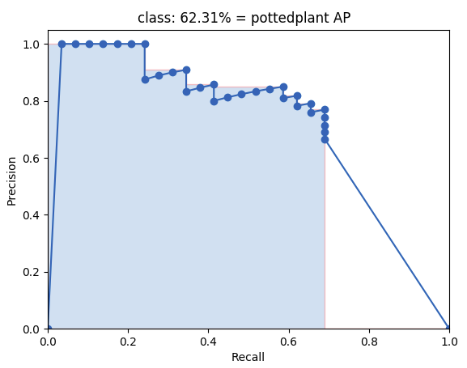
Then the area under this curve is the mAP of this class.
We separated test data into 10 groups, and calculates the mAP of each class for each group. Your goal is to maximize the total mAP score.
import sys
sys.path.insert(0, './evaluate')
import evaluate
# evaluate.evaluate("input prediction file name", "desire output csv file name")
evaluate.evaluate('./test_prediction.txt', './output_file.csv')
End Evalutation
Visualization
Here we provide a simple code to draw the predicted bounding box and class onto the image and visualize using matplot.
import matplotlib.pyplot as plt
import cv2
classes_name =  ["aeroplane", "bicycle", "bird", "boat", "bottle",
                 "bus", "car", "cat", "chair", "cow", "diningtable",
                 "dog", "horse", "motorbike", "person", "pottedplant",
                 "sheep", "sofa", "train","tvmonitor"]
np_img = cv2.imread('./VOCdevkit_test/VOC2007/JPEGImages/000002.jpg')
resized_img = cv2.resize(np_img, (IMAGE_SIZE, IMAGE_SIZE))
np_img = cv2.cvtColor(resized_img, cv2.COLOR_BGR2RGB)
resized_img = np_img
np_img = np_img.astype(np.float32)
np_img = np_img / 255.0 * 2 - 1
img_tensor = torch.from_numpy(np_img).permute(2, 0, 1).unsqueeze(0).to(device)

y_pred = prediction_step(img_tensor).cpu().numpy()
xmin, ymin, xmax, ymax, class_num, conf = process_outputs(y_pred)
class_name = classes_name[class_num]
cv2.rectangle(resized_img, (int(xmin), int(ymin)), (int(xmax), int(ymax)), (0, 255, 255), 3)
cv2.putText(resized_img, class_name, (0, 200), 2, 1.5, (0, 255, 255), 2)

plt.imshow(resized_img)
plt.show()

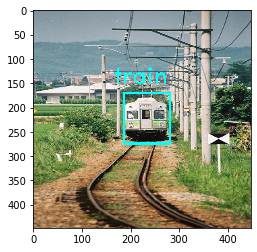
As you can see, the result of current model needs some improvements. After training, your model shall have at least the capability to output prediction like this:
Other Models
Fast-RCNN
Roi pooling (api source)
Region of interest pooling (RoI pooling) is an operation widely used in object detecion tasks using convolutional neural networks. It was proposed by Ross Girshick (paper) and it achieves a significant speedup of both training and testing. It also maintains a high detection accuracy. The layer takes two inputs:
- A fixed-size feature map obtained from a deep convolutional network with many convolutions and max pooling layers.
- An N-by-5 matrix of representing a list of regions, where N is a number of RoIs. The first columns represents the image index and the remaining four are the coordinates of the top left and bottom right corners of the region.
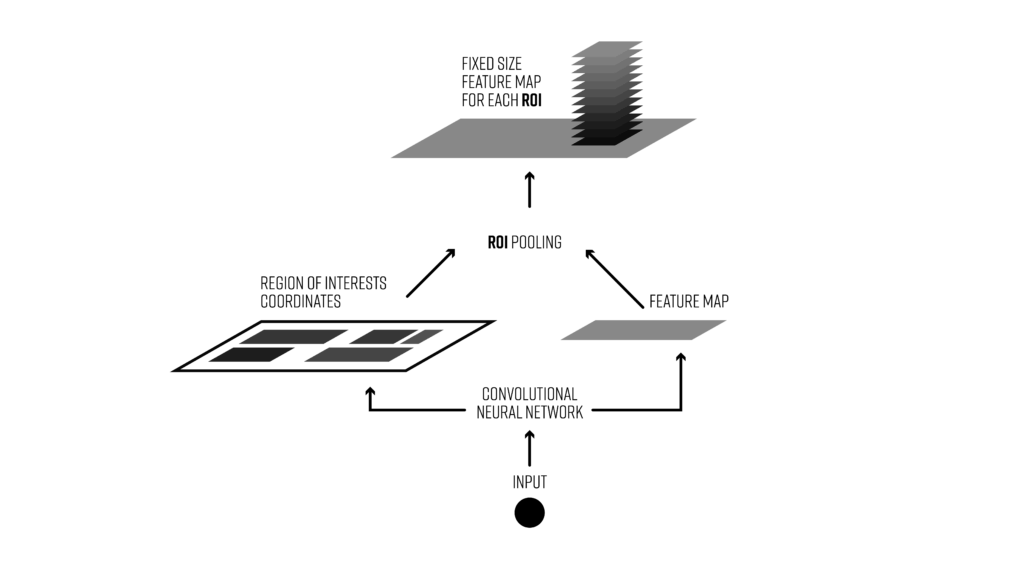
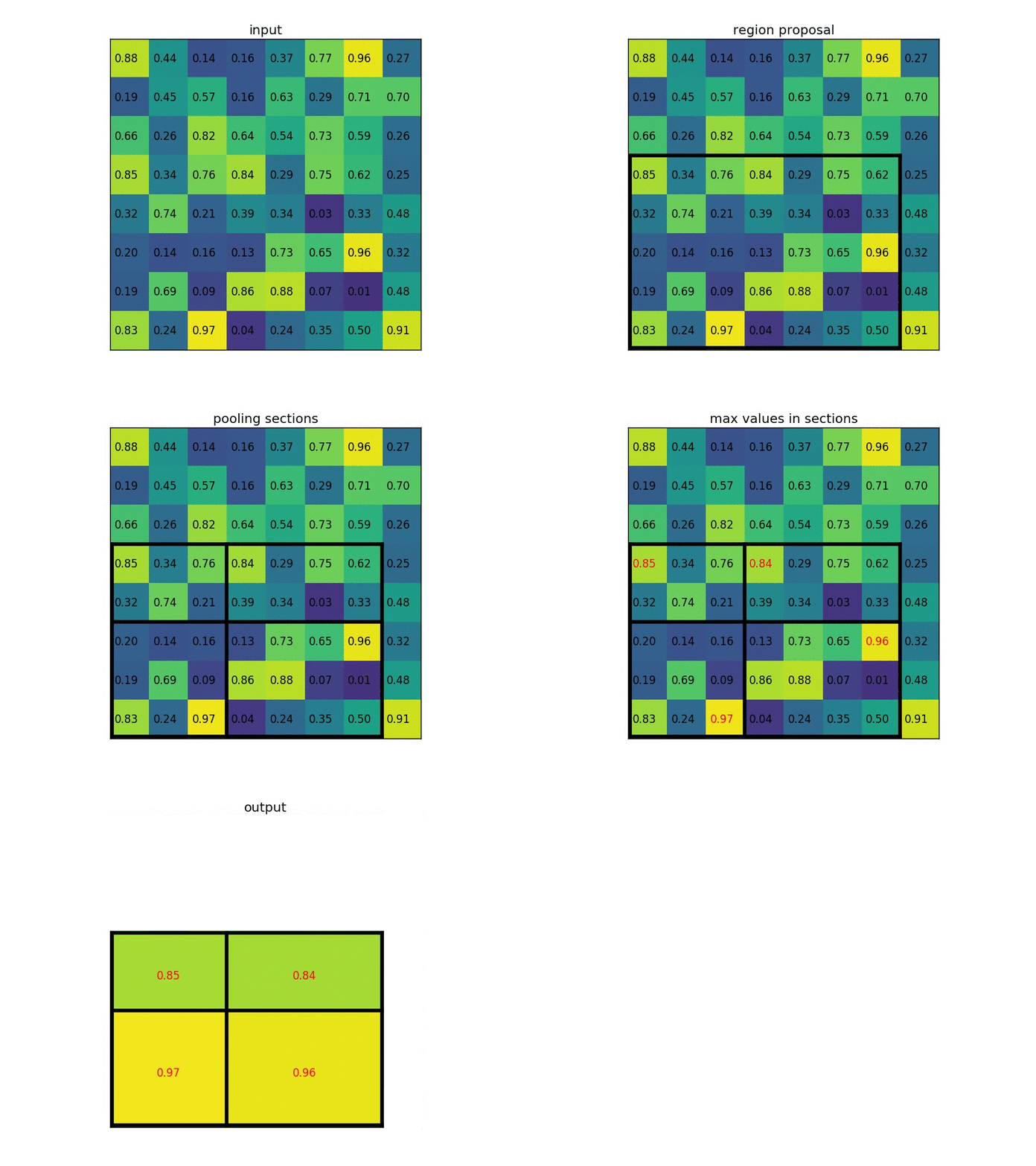
What does the RoI pooling actually do? For every region of interest from the input list, it takes a section of the input feature map that corresponds to it and scales it to some pre-defined size (e.g., 7×7). The scaling is done by:
- Dividing the region proposal into equal-sized sections (the number of which is the same as the dimension of the output)
- Finding the largest value in each section
- Copying these max values to the output buffer
The result is that from a list of rectangles with different sizes we can quickly get a list of corresponding feature maps with a fixed size.
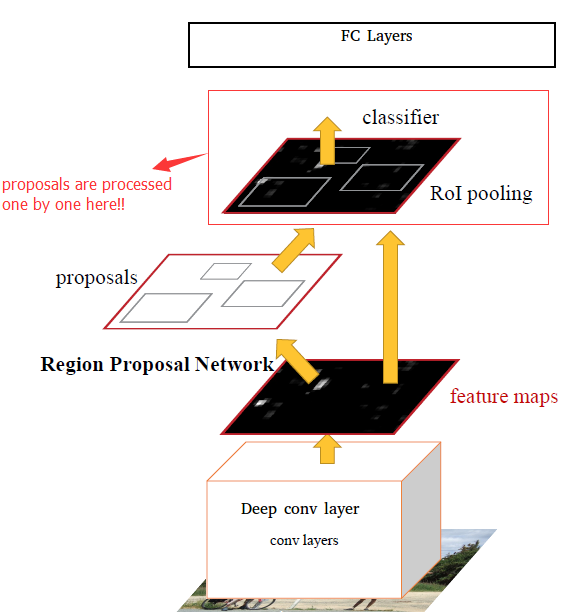
Faster-RCNN
The main idea is use the last conv layers to infer region proposals. Faster-RCNN consists of two modules.
- Region Proposal Network (RPN): Gives a set of rectangles based on deep convolution layer.
- Fast-RCNN RoI Pooling layer: Classify each proposal, and refining proposal location.
Precautions
Scoring and Report
Your score will be part of the final private result on Kaggle and part of your report.
- Your report(
.ipynbfile) should have:- Your code
- What kind of models you have tried and how did they work.
- Anything you've done and want to tell us.
- What problems occured and how did you solve them.
What you can do
- Implement other models by yourself.
- Load pretrained models trained on ImageNet. e.g. vgg19, resnet, etc. (ex. tf.keras.application)
- Data augmentation.
What you should NOT do
- Load pretrained object detection model weights directly from other sources.
- Clone other's project from github or other sites. (You should implement by yourself).
- Plagiarize codes from other teams.
- Pretrain your network on other dataset (you can only use the pascal data we provided on Kaggle).
- Use the groundtruth to generate output.
Competition timeline
- 2026/10/22(Thu.) competition announced.
- 2026/11/18(Wed.) 23:59 competition deadline.
- 2026/11/22(Sun.) 23:59 report deadline.
- 2026/11/26(Thu.) winner teams share.